Latest Event Updates
uninitialized constant AuthorizeApiRequest::JsonWebToken
Was a weird error.I build fully functioning apps locally before deployment. Locally when running rails server, this error never came up.
When I deployed the app to heroku, I then started receiving that error.
I thought adding “require ‘jwt'” might help, but it didn’t.
This comment by MikaOY pointed me in the right direction:
“Turns out it isn’t a problem with the AuthO implementation, just that libs/ is not included by auto-loaded by default in some versions of Rails.”
Well, I looked in application.rb and I was already autoloading lib. But it pushed me in the right direction.
I specifically had to require_relative the rb file that contained JsonWebToken. Still looking into why that is so, especially since I have a working instance locally. It could just be something with heroku. But hope this helped someone.
Pushing a non-master branch to Heroku
I completed a React project with a Rails API backend. Locally everything worked prefectly. When trying to change environment variables like the address of the API backend, I wanted to create a seperate branch for heroku, it case I needed to edit something for heroku. I would rather not clutter “master” with changes until they are 100% working.
Problem is heroku only recognizes master branches, but to test I need to commit to master
Well there is a work aorund, just push a different branch up to heroku manually
git push heroku [name-of-your-branch]:master
this way I can push up a branch I named heroku up to heroku.
Credit: link from Jordon Trevino
Difference between localhost sites and heroku hosted sites
I built an app, Everything works perfectly locally.
Time to deploy to heroku.
Once on heroku I noticed that sometimes when I submitted something to my api from my front end site, there would be a significant delay of 2-3 seconds occasionally.
Other than possible removing heroku as the culprit by upgrading, the issue could possibly still be network related.
To bypass this I am going to build in a display message to show users that they did actually hit submit so they aren’t tempted to click submit twice.
Still dealing with network issues despite leaving Systems Administration behind.

Github markdown create links to sections in same md file
tldr: [Link text or description](#this-is-my-header-name-I-want-to-link-to)
I had a long Readme file, and wanted easy access on top to the sections of the Readme.md file.
If you have a header, you can link to that header
create a header: ##This is my header

the link to the header would be: [Link text or description](#this-is-my-header)
As you can see its just converting your text to lowercase and using dash instead of spaces.
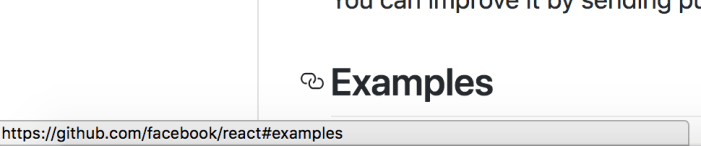
If you are having a problem, you can always highlight the header and the link will show at the bottom of chrome. See how that python looking object showed up next to “Examples”, and at the bottom is the full hyerlink. In this example, just the #example would suffice as I did in my example above
Fix to : Links must not point to “#”. Use a more descriptive href or use a button instead jsx-a11y/href-no-hash
Getting warning:
Links must not point to “#”. Use a more descriptive href or use a button instead jsx-a11y/href-no-hash
While its only a warning in the browser window, I still wanted to see if there was a way to fix it.
BEFORE:
<a href=”#” onClick={this.handleClick} >Link to something</a>
FIX
<a tabIndex=”0″onClick={this.handleClick}>Link to something</a>
Using # , while a HTML staple, is considered broken in React.
event.target vs event.currentTarget
A good explanation of target vs currentTarget
targetis whatever you actually clicked on. It can vary, as this can be within an element that the event was bound to.currentTargetis the element you actually bound the event to. This will never change.
If you are clicking a component and the onClick is on the parent but are getting back the child, try currentTarget
TypeError: Cannot read property ‘search’ of undefined
In a react componenet, I was having a problem calling a function from another function. I kept getting the error
TypeError: Cannot read property 'search' of undefined
by binding “this” to the first function, it was then able to call the second function.
This example by Rafi Ud Daula Refat on Stackoverflow helped me figure this out.
Here is a little example using some code I made for my project
import React, { Component } from 'react';
class Header extends Component {
search() {
console.log("Enter Button Pressed");
}
handleKeyPress(target) {
if(target.charCode==13){
this.search();
}
}
render(){
return(
 input  onKeyPress={this.handleKeyPress.bind(this)} placeholder="Enter search term"
)
}
*note input not in <> because wordpress doesnt render it correct, keeps making actual inputs or removes the text
Print something x number of times in JSX / ReactJS
If you are using ReactJS you might be asking how to print something x number of times.
plain characters there are many ways to do this such as
let stars = "*".repeat(this.props.review.rating) //where rating is 5
this doesn’t work in when you start using elements as the subject of repetition
for the code:
let newstars = .repeat(this.props.review.rating)
this is the error
TypeError: __WEBPACK_IMPORTED_MODULE_0_react___default.a.createElement(…).repeat is not a function
The fix is to add items the following way:
let newstars = []

for(let i=0;i<this.props.review.rating;i++){

  stars.push()

}
//now display the JSX as such in your return
{newstars}
Radioboxes in ReactJs, use state for a controlled experience
Control your radioboxes with state, to automatically select/unselect a radiobox.
Example, in a rating system, If I were giving a review 3 stars and change my mind to 5 stars, the 4th star should be sleected authomatically. This is just a design choice.
Here is the code below:
</pre>
import React, { Component } from 'react';
class AddReview extends Component {
state={
rating1: false,
rating2: false,
rating3: false,
rating4: false,
rating5: false
}
handleRating = (event)=>{
switch (event.target.name) {
case "rating5":
this.setState({rating1: true, rating2: true, rating3: true, rating4: true, rating5: true})
break;
case "rating4":
this.setState({rating1: true, rating2: true, rating3: true, rating4: true, rating5: false})
break;
case "rating3":
this.setState({rating1: true, rating2: true, rating3: true, rating4: false, rating5: false})
break;
case "rating2":
this.setState({rating1: true, rating2: true, rating3: false, rating4: false, rating5: false})
break;
case "rating1":
this.setState({rating1: true, rating2: false, rating3: false, rating4: false, rating5: false})
break;
default:
}
}
render(){
return(
<div>
example input below: just make the rest. doesnt render correctly in wordpress but should give you an idea where to get started if you needed direction
input type="radio" id="star2" name="rating2" value={this.state.rating2} checked={this.state.rating2} onClick={this.handleRating}</div>
)
}
}
<pre>
Bypass authentication for signup page in Rails API
I added authentication on my rails api.
Works great, only authenticated users can now call on the api.
Now my problem was that I am unable to signup, since it requires authentication. Catch-22.
how to bypass?
Authentication is being inherited from application_controller.rb
for the signup controller, I just inherited directly from ActionController::API
This was helpful if you need to setup the api and you need assistance.
 vSPARROW