Month: June 2020
JavaScript – Division get whole numbers using bitwise operators
When you divide 9/5 in JavaScript you get 1.8, which is a fractional number. What if we only wanted a remainder-less whole number quotient, C integer style?
printf("%i",7/5); /* C prints 1 */
Most often, you will see people use Math.floor
console.log(Math.floor(7/5)) // prints 1Another method you can use is to use the bitwise NOT operator ~ to do the same thing
console.log(~~(7/5)) //prints 1leetcode: Plus One : JavaScript submission beats 99.90% in memory usage
What the problem is asking for is to take the array and treat the whole thing as an integer. So [1,2,3] is the number 123, and if you add 1 that is 124. Then you would return [1,2,4].
You cannot just add 1 to the end, because for [5,6,9] you would need to return [5,7,0]. 569 + 1 = 570
Another thing to consider is that if the input is [9,9,9] then the returned array is larger having values [1,0,0,0]. 999 + 1 = 1000
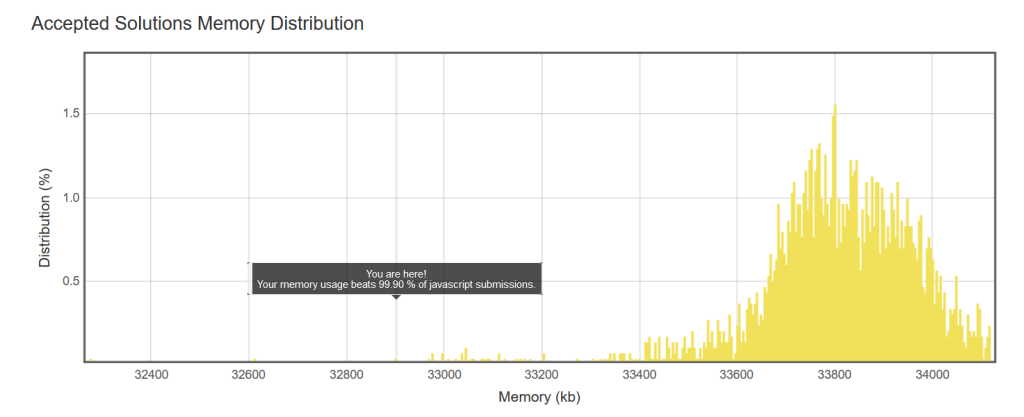
The code I used is below. You can’t use the join, convert to number trick since some of the inputs are too large and then are rounded up loosing the trailing digits.
var plusOne = function(digits) {
    // return (parseInt(digits.join(""))+1).toString().split("")
    //the above looses precision when the number is too large

    for(let i=digits.length-1;i>=0; i--){
        if(digits[i]<9){digits[i]=digits[i]+1; return digits}
        digits[i]=0
    }
    //if we are here the first value in array was a 9
    digits.unshift(1)
    return digits
};
My runtime only beat 10.41% of the solutions. Great on memory, poor on performance.
Bitwise XOR / caret ^ operator in JavaScript
There is a XOR operator in JavaScript! Its the carrot symbol, ^, which is the symbol above the number 6 on a US keyboard.
In JavaScript the XOR operator can be written as such
x ^= y 	//shorthand
x = x ^ y
The bitwise XOR assignment operator uses the binary representation of both operands, does a bitwise XOR operation on them and assigns the result to the variable.
https://developer.mozilla.org/en-US/docs/Web/JavaScript/Reference/Operators/Assignment_Operators#Bitwise_XOR_assignment
The chances are if you are doing this in JavaScript its for a coding excessive where among an array of integers, all are duplicates except one. Thanks to the power of bitwise operations you just XOR all the values until you are left with a remainder. The gist of it is that two like numbers cancel each other out. To understand “how” take a deep dive into binary, which I may add in a future article. But to just “do”, look at the following
//this is pseudo code
[3,4,5,4,3] //array with a single unique value
let x=0 // we will use this to handle our values
//loop over every element
x^=3 //3
x^=4 //7
x^=5 //2
x^=4 //6
x^=3 //3

x is 5
Looping through the array we found the single unique value. The above won’t make sense in base10, you have to do it in binary if you want to make sense of it. Otherwise that is how to do it.
leetcode: Contains Duplicate : JavaScript submission 86%+ runtime
I did leetcode’s “Contains Duplicate” problem and surprisingly got my runtime to beat 86.89% of other JavaScript solutions.

The code uses JavaScript’s Set object which “lets you store unique values of any type, whether primitive values or object references.” The premise of the solution is that every time a value appears, we check the set to see if it exists. If not we add it to the set. If it does exist we return a true, ending the program.
An additional note, the reason that forEach would not be a good choice is that you can’t return from a forEach. So if I found in index 1 that we have a duplicate, with a for loop we can return and the function does not need to iterate over n more elements. With a forEach we would have to wait until the end of the forEach when the answer is already known
var containsDuplicate = function(nums) {
    let set = new Set()
    for(i=0;i<nums.length;i++){
        if(set.has(nums[i])){return true}
        set.add(nums[i])
    }
    return false
};leetcode: reverse integer: correct answer marked wrong
I was doing leetcode’s reverse integer which as it’s name implies expects an integer to be reverse. example: 562 should be returned as 265.
The website marked my solution wrong even though my solution returned a revered number. The testcase 1534236469 had returned 9646324351 by my solution. Leetcode expected 0
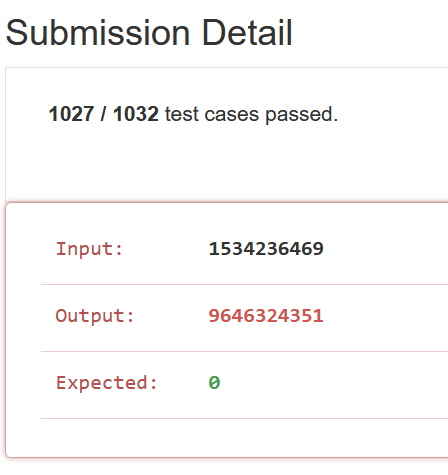
The reason this is happening is because leetcode expects to only deal with a “32-bit signed integer”, and the output is larger than the maximum value of a 32-bit signed integer.
The largest a 32 bit signed integer can be is 2,147,483,647. A bit smaller than 9,646,324,351. I adjusted my solution and now received an acceptance.
var reverse = function(x) {
    let isNegative = x < 0 || false
    let rArray = x.toString().split("")
    console.log("rArray is",rArray)
    if(isNegative){ rArray.shift()}
    let rInt = parseInt(rArray.reverse().join(""))
    if (rInt > 2147483647) {return 0}
    return (isNegative ? rInt - 2 * rInt : rInt)
};
//pseudocode
    //convert to string //split into array
    // if  negative is true shift first char
    //reverse array // convert to string //convert to num
//if negative true, subtract 2 * xAdobe Digital Editions E_ADEPT_CORE_EXPIRED fixed!
Was getting this error on Adobe Digital Editions
Error getting License. License Server Communication Problem: E_ADEPT_CORE_EXPIRED
This was the solution to the ADE problem
- Fix the clock – it was off by 1 day. Helped customer fix their clock
- Reboot
- Open Adobe Digital Editions
- De-authorize Adobe Digital Editions
- Press ‘Command + Shift + D’.
- Select ‘Erase Authorization’.
- Click OK and close Adobe Digital Editions .
- Re-open Adobe Digital Editions.
- Authorize Adobe Digital Editions
- Press ‘Command + Shift + U’.
- Enter your Adobe ID and password.
Can now load books onto ADE
- ← Previous
- 1
- 2
 vSPARROW