Latest Event Updates
ECMAScript 2017 padEnd() and padStart()
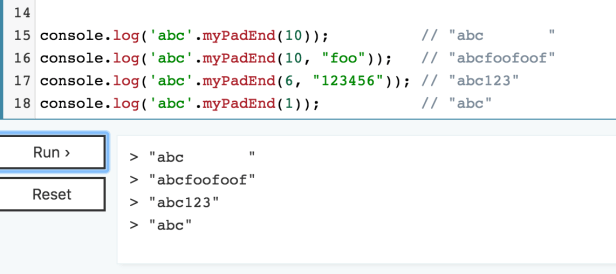
Two new methods implemented in the 2017 version of Javascript are padEnd and padStart. Both methods pad a string with second string, until the result is of the desired indicated length. Given that the return value of padEnd and padStart are new Strings, and the original strings are unmodified, the methods a “pure”, as they do not cause side-effects. As you can see from the examples below, this is true as str1 in the example is unmodified.

Now the length of our example string, str1 is 17. If the target length is less than the size of the primary string, the primary string will be returned. If the target length is less than the size of the primary string and the added string, the added string will be truncated to fit the target length. Example below:

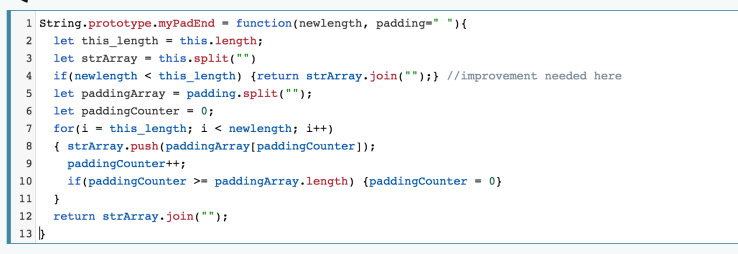
If your browser doesn’t have these methods because it doesn’t support ECMAScript 2017 you can actually write your own methods and add them to the String prototype, extending it. I changed the styling such that it can fit in a smaller picture, so heres an example of padEnd() implemented by me: below. See also the repl link if you would like to play with it
Binary: an introduction
If I told you I would give you 10 dollars for a Five dollar bill, you probably would be excited. But if you received two dollars, you might be livid. “Where is the ten dollars you promised?” But I said 10 dollars not ten dollars. The 10 is binary. In binary 10 is 2. Are you confused? Don’t worry, it should make sense by the end
“ a binary number is a number expressed in the base-2 numeral system or binary numeral system, which uses only two symbols: typically 0 (zero) and 1 (one).”[1]
The number system we are used to is called decimal. The digits consist of 0,1,2,3,4,5,6,7,8,9 and are part of base ten notation. With binary, or base2 notation, the only digits are 0, and 1. While it may seem counterintuitive, every number that can be made with the decimal system can also be made in binary. Coincidentally this is how computers count and add digits, binary is the “native language” of computers.
What does zero to ten look like in binary?
- Zero 0
- One 1
- Two 10
- Three 11
- Four 100
- Five 101
- Six 110
- Seven 111
- Eight 1000
- Nine 1001
- Ten 1010
Binary addition:
Addition in binary is just like decimal addition, adding from right to left, and carrying over carry values.
Lets go through an example: We will add Ten (1010) and eleven (1011)
- Ten + Eleven = sum
- Sum is currently 0
- 1010 + 1011 : sum 0 : carry 0
- Remember, Start with rightmost digits: Digits we worked on will be replaced with x
- 1010 + 1011 = 0 + 1 = 1 : sum is 1 : carry is 0
- 101x + 101x = 1 + 1 = 10: sum is 01 : carry is 1
- 10xx + 10xx = 0 + 0 + carry(1) : sum is 101 : carry is 0
- 1xxx + 1xxx = 1 + 1 = 10 : sum is 0101 : carry is 1
- Sum is 10101
- 10101 is 21 in decimal, addition complete!
Assembly Language introduction
What is assembly
Assembly is a language that is written as close to the hardware’s understanding while leaving room for a human’s understanding. A lot of the details hidden from view by higher order languages are exposed to the developer, which can be good for bad. “Assembly languages have the same structure and set of commands as machine languages, but they enable a programmer to use names instead of numbers.” [1]
Reasons to use assembly
“Today, assembly language is used primarily for direct hardware manipulation, access to specialized processor instructions, or to address critical performance issues. Typical uses are device drivers, low-level embedded systems, and real-time systems.”[2] Specialized hardware programmers need to address new hardware as its developed. A new piece of hardware will have new abilities that existing drivers (set of instructions) can understand. Another example could be speed optimizations. Compilers that convert higher order languages add a lot of “bloat” to executable files. A similar concept in web programming could be installing JavaScript assets like Bootstrap, when you only needed to change a button. This adds some slight bloat, which will be unnoticeable to us on modern systems. But let’s say we have a budget phone, or even a car sensor. We want minimize the size of the file run for speed returns.
React – onClick captures children as target rather than parent
I placed some data in the parent div that I wanted to use when the div was clicked.
Using event.target was not working because I was getting the children elements as the target and not the parent div as I wanted.
div  onClick={this.handleClick} name={item.name}  //want this as event target h2
Welcome h2
h3 {item.name} h3
h4 Item found in: {Item.location} h4
/div
The fix was below:
handleClick = (event)=>{
event.preventDefault();
console.log(event.currentTarget);
const target = event.target
Uncaught TypeError: Super expression must either be null or a function, not undefined in React app
Running a react app, nothing is showing up.
This is the error I am getting in console:
Uncaught TypeError: Super expression must either be null or a function, not undefined
From bundle.js:22486
In console, I expand and click on the link to bundle.js:22486
I get back this line, but the important part is at the end:
function _inherits(subClass, superClass) { if (typeof superClass !== “function” && superClass !== null) { throw new TypeError(“Super expression must either be null or a function, not ” + typeof superClass); } subClass.prototype = Object.create(superClass && superClass.prototype, { constructor: { value: subClass, enumerable: false, writable: true, configurable: true } }); if (superClass) Object.setPrototypeOf ? Object.setPrototypeOf(subClass, superClass) : subClass.__proto__ = superClass; } // import React, {Componenet} from ‘react’
Can you see what was wrong?
I spelled Component wrong. But the error doesn’t directly say that, you need to dig a little.
One I fixed the error, I was able to see my app
React: TypeError: Cannot read property ‘request’ of undefined
I was getting the error : TypeError: Cannot read property ‘request’ of undefined while I was building a react lab.
I noticed it said something about components not installed. I had ran npm install before but that wasn’t the fix.
yarn install is what fixed it, looks like some packages depended on yarn rather than npm.
Heroku: No default language could be detected for this app.
I was uploading a vanilla JavaScript application to heroku.
Looks like I will need a buildpack for it to deploy. This is so Heroku can understand what type of app it has.
Solution1: Just deploy it as a github page.
Since its a static site, there is nothing “serving” index.html, and heroku is a cloud platform, hosting apps, not a “webhost” in the web 2.0 sense.
Since I want to keep everything on heroku for now, lets see what else we can do.
Attempted Solution: rename index.html to index.php
The least effort solution is to rename your default file to index.php and redeploy. Heroku will detect it as a PHP site and use that buildpack. – John Beynon
Very curious! Would this work? Why not try it out.
hmm appears to work! I was going to deploy a sinatra app or ry the heroku static bundle and I will probably do that anyway but this quick solution can be a real timesaver!
Deploy your Rails API onto Heroku
Go to your Heroku Dashboard. Click “new”-> “create new app”

Give your app a name and click “Create app”

There are several ways to deploy
- Heroku CLI – push your project up to Heroku from your command line
- Github – Heroku is connected to github, so everytime github is updated your app is
- Dropbox connected
- Container Registry
We will be using Heroku CLI. If you need to install use these instructions
By default Heroku ONLY supports the master branch. If you want to push up a branch other than master follow these instructions.
Add Heroku as a remote to your project
heroku git:remote -a name-of-your-heroku-app
Push your project to Heroku
git push heroku master
Did you just get an error? Did you use sqlite3 for your project?
remote: An error occurred while installing sqlite3 (1.3.13), and Bundler cannot
remote: continue.
remote: Make sure that `gem install sqlite3 -v ‘1.3.13’` succeeds before bundling
remote:
remote: In Gemfile:
remote: sqlite3
remote: !
remote: ! Failed to install gems via Bundler.
Migrate and seed your database
In your command line run the following commands.
heroku run rake db:migrateheroku run rake db:seed
Test your API using Postman
To get the address, just go back to the Heroku dashboard and click on “Open app” to get the link to your online api

If you made it this far, your API should be deployed and now test it as you did locally (you did test locally didn’t you???).
The reason you need postman is if you setup your Rails API correctly when you query your site via browser you should get an error
This appname-api.herokuapp.com page can’t be found
but if you connect to it via postman you should get back the appropriate response
Converting Rails from sqlite3 to PostgreSQL
Your mod 3 and 4 projects were probably done using sqlite3. If you did your mod5 project in sqlite3, tsk tsk!
- edit your Gemfile
- comment out sqlite and add gem pg

- run “bundle install”
- edit
config/database.yml - Change your databases names, as below.

- run
rake db:create - run
rake db:migrate - run
rake db:seed(if you have a seed file) - Now test your app, and you are now using Postgres!
How do I know that it worked?
- Go to the little Postgres elephant, and click him
- Press stop
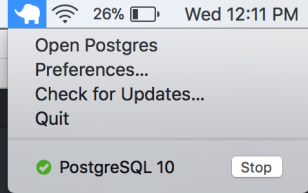
- If your site does not work, then you migrated successfully. Refresh your browser if needed
- Now start up Postgres so you can continue developing!
I couldn’t get into on of my heroku sites
Strange news on heroku, one of my heroku apps was not working even though nothing had changed.
This nameofmyapp-api.herokuapp.com page can’t be found
No webpage was found for the web address: https: // nameofmyapp-api.herokuapp.com/
HTTP ERROR 404
The problem doesn’t appear to be an app issue, rather a DNS issue.
Last I had checked it, it was working fine. I had used it on and off for several days. After about a week, I came back to it and found it in this state. I even clicked the app from the “Open app” tab in heroku. I don’t want to rename the app to see if it would work, because I should not have to do that.
Steps taken
- Dynos restarted
- Heroku log checked.
- Run postman against the API
Then I realize that I am looking at the API version of the app, not the similarly named frontend.
The api doesn’t respond to requests at the top level route. That is by design. The front end is named https://nameofmyapp-app.herokuapp.com/ similar to https://nameofmyapp-api.herokuapp.com/.
Ways to prevent this in the future:
- Add “API” to the beginning of the name rather then the end.
- Add custom domain to the front end
- READ CAREFULLY!
 vSPARROW